Bayesian Approaches to fMRI: Thoughts

Pictured: Reverend Thomas Bayes, Creator of Bayes' Theorem and Nerd Baller

This summer I have been diligently writing up my qualification exam questions, which will effect my entry into dissertation writing. As part of the qualification exam process I opted to perform a literature review on Bayesian approaches to fMRI, with a focus on spatial priors and parameter estimation at the voxel level. This necessarily included a thorough review of the background of Bayesian inference, over the course of which I gradually became converted to the view that Bayesian inference was, indeed, more useful and more sophisticated than traditional null hypothesis significance testing (NHST) techniques, and that therefore every serious scientist should adopt it as his statistical standard.

At first, I tended to regard practitioners of Bayesian inference as seeming oddities, harmless lunatics so convinced of the superiority of their technique as to come across as almost condescending. Like all good proselytizers, Bayesian practitioners appear to be appalled by the putrid sea of misguided statistical inference in which their entire field had foundered, regarding their benighted colleagues as doomed unless they were injected with the appropriate Bayesian vaccine. And in no place was this zeal more evident than their continual attempts to sap the underlying foundations of NHST and the assumptions on which it rested. At the time I considered these differences between the two approaches to be trivial, mostly because I convinced myself that any overwhelmingly large effect size acquired in NHST would be essentially equivalent to a parameter estimate calculated by the Bayesian approach.

Bayesian Superciliousness Expressed through Ironic T-shirt

However, the more I wrote, the more I thought to myself that proponents of Bayesian methods may be on to something. It finally began to dawn on me that rejecting the null hypothesis in favor of an alternative hypothesis, and actually being able to say something substantive about the alternative hypothesis itself and compare it with a range of other models, are two very different things. Consider the researcher attempting to make the case that shining light in someone's eyes produces activation in the visual cortex. (Also consider the fact that doing such a study in the good old days would get you a paper into Science, and despair.) The null hypothesis is that shining light into someone's eyes should produce no activation. The experiment is carried out, and a significant 1.0% signal change is observed in the visual cortex, with a confidence interval from [0.95, 1.05]. The null hypothesis is rejected and you accept the alternative hypothesis that shining light in someone's eyes elicits greater neural activity in this area than do periods of utter and complete darkness. So far, so good.

Then, suddenly, one of these harmless Bayesian lunatics pops out of the bushes and points out that, although a parameter value has been estimated and a confidence interval calculated stating what range of values would not be rejected by a two-tailed significance test, little has been said about the credibility of your parameter estimate. Furthermore, nothing has been said at all about the credibility of the alternative hypothesis, and how much more believable it should be as compared to the null hypothesis. These words shock you so deeply that you accidentally knock over a nearby jar of Nutella, creating a delicious mess all over your desk and reminding you that you really should screw the cap back on when you are done eating.

Bayesian inference allows the researcher to do all of the above mentioned in the previous paragraph, and more. First, it has the advantage of being uninfluenced by the intentions of the experimenter, the knowledge of which is inherently murky and unclear, but on which NHST "critical" values are based. (More on this aspect of Bayesian inference, as compared to NHST, can be found in a much more detailed post here.) Moreover, Bayesian analysis sheds light on concepts common to both Bayesian and NHST approaches while pointing out the disadvantages of the latter and outlining how these deficiencies are addressed and mitigated in the former, whereas the converse approach is not true; this stems from the fact that Bayesian inference is more mathematically and conceptually coherent, providing a single posterior distribution for each parameter and model estimate without falling back on faulty, overly conservative multiple correction mechanisms which punish scientific curiosity. Lastly, Bayesian inference is more intuitive. We should intuitively expect our prior beliefs to influence our interpretation of posterior estimates, as more extraordinary claims should require correspondingly extraordinary evidence.

Having listened to this rhapsody on the virtues and advantages of going Bayesian, the reader may wonder how many Bayesian tests I have ever performed on my own neuroimaging data. The answer is: None.

Why is this? First of all, considering the fact that a typical fMRI dataset is comprised of hundreds of thousands of voxels, and given current computational capacity, Bayesian inference for an single neuroimaging session can take prohibitively long amounts of time. Furthermore, the only fMRI analysis package I know of that allows for Markov-Chain Monte Carlo (MCMC) sampling at each voxel is FSL's FLAME 1+2, although this procedure can take on the order of days for a single subject, and the results usually tend to be more or less equal to what would be produced through traditional methods. Add on top of this models which combine several levels of priors and hyperparameters which mutually constrain each other, and the computational cost increases even more exponentially. One neuroimaging technique which uses Bayesian inference in the form of spatial priors in order to anatomically constrain the strength and direction of connectivity - an approach known as dynamic causal modeling (DCM; Friston et al, 2003) - is relatively unused among the neuroimaging community, given the complexity of the approach (at least, outside of Friston's group). Because of these reasons, Bayesian inference has not gained much traction in the neuroimaging literature.

However, some statistical packages do allow for the implementation of Bayesian-esque concepts, such as mutually constraining parameter estimates through a process known as shrinkage. While some Bayesian adherents may balk at such weak-willed, namby-pamby compromises, in my experience these compromises can satisfy both the some of the intuitive concepts of Bayesian methods while allowing for more efficient computation time. One example is AFNI's 3dMEMA, which estimates the precision of the estimate for each subject (i.e., the inverse of the variance of that individual's parameter estimate), and weights it in proportion to its precision. For example, a subject with less variance would be weighted more when taken to a group-level analysis, while a subject with a noisy parameter estimate would be weighted less.

Overall, while comprehensive Bayesian inference at the voxel level would be ideal, for right now it appears impractical. Some may take issue with this, but until further technological advances in computer speed or clever methods which allow for more efficient Bayesian inference, current approaches will likely continue.

Breaking Bad


As of right now, Breaking Bad is my favorite TV show. Heck, it is the only TV show I watch right now; I don't have a television, and I simply stream episodes from Amazon onto my laptop. For me, injecting this show into my eyeballs every Sunday is as addictive as Walter White's trademark blue meth.

Now that I have stated this, my unabashed fanboy attitude toward this show, let me step back and give a few reasons for it, and clear up any misconceptions people might have:

Reason #1: It's awesome.

Reason #2: Bryan Cranston reminds me of my dad, except for the goatee.


Anyone just starting out with this show may find it at times either too unrealistic or melodramatic for their taste, but the only advice I can give is: Stick with it. It only gets better. Every season, and almost every episode even, seems to get better and out-top the last one. And that is the magnetic appeal of it - it just keeps getting better. More refined. More pure.

Just like Walt's product.


FSL Tutorial 2: FEAT (Part 2): The Reckoning

(Note: Hit the fullscreen option and play at a higher resolution for better viewing)


Now things get serious. I am talking more serious than the projected peak Nutella in 2020, after which our Nutella resources will slow down to a trickle and then simply evaporate. This video goes into detail about the FEAT stats tab, specifically what you should and shouldn't do (which pretty much means just leaving most of the defaults as is), lest you screw everything up, which, let's face it, you probably will anyway. People will tell you that's okay, but it's not.

I've tried to compress these tutorials into a shorter amount of time, because I usually take one look at the duration of an online video and don't even bother with something greater than three or four minutes (unless it happens to be a Starcraft 2 replay). But there's no getting around the fact that this stuff takes a while to explain, so the walkthroughs will probably remain in the ten-minute range.

To supplement the tutorial, it may help to flesh out a few concepts, particularly if this is your first time doing stuff in FSL. The most important part of an fMRI experiment - besides the fact that it should be well-planned, make sense to the subject, and be designed to compare hypotheses against each other - is the timing. In other words, knowing what happened when. If you don't know that, you're up a creek without Nutella a paddle. There's no way to salvage your experiment if the timing is off or unreliable.

The documentation on FSL's website isn't very good when demonstrating how to make timing files, and I'm surprised that the default option is a square waveform to be convolved with a canonical Hemodynamic Response Function (HRF). What almost every researcher will want is the Custom 3 Column format, which specifies the onset of each condition, how long it lasted, and any auxiliary parametric information you have reason to believe may modulate the amplitude of the Blood Oxygenation Level Dependent (BOLD) response. This auxiliary parametric information could be anything about that particular trial of the condition; for example, if you are showing the subject one of those messed-up IAPS photos, and you have a rating about how messed-up it is, this can be entered into the third column of the timing file. If you have no reason to believe that one trial of a condition should be different from any other in that condition, you can set every instance to 1.

Here is a sample timing file to be read into FSL (which they should post an example of somewhere in their documentation; I haven't been able to find one yet, but they do provide a textual walkthrough of how to do it under the EV's part of the Stats section here):

10  1  1
18  1  1
25  1  1
30  1  1


To translate this text file, this would mean that this condition occurred at 10, 18, 25, and 30 seconds relative to the start of the run; each trial of this condition lasted one second; and there is no parametric modulation.

A couple of other things to keep in mind:

1) When setting up contrasts, also make a simple effect (i.e., just estimate a beta weight) for each condition. This is because if everything is set up as a contrast of one beta weight minus another, you can lose valuable information about what is going on in that contrast.

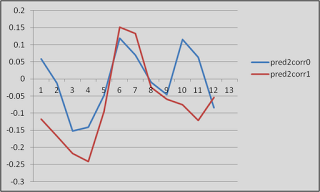
As an example of why this might be important, look at this graph. Just look at it!

Proof that fMRI data is (mostly) crap


These are timecourses extracted from two different conditions, helpfully labeled "pred2corr0" and "pred2corr1". When we took a contrast of pred2corr0 and compared it to pred2corr1, we got a positive value. However, here's what happened: The peaks of the HRF (represented here by the timepoints under the "3" in the x-axis, which translates into 6 seconds (3 scans of 2 seconds each = 6 seconds), representing the typical peak of the HRF after the onset of a stimulus) for both conditions were negative. It just happened that the peak for the pred2corr1 condition was more negative than that of pred2corr0, hence the positive contrast value.

2) If you have selected "Temporal Derivative" for all of your regressors, then every other column will represent an estimate of what the temporal derivative should look like. Adding a temporal derivative has the advantage of accounting for any potential lags in the onset of the HRF, but comes at the cost of a degree of freedom, since you have something extra to estimate.

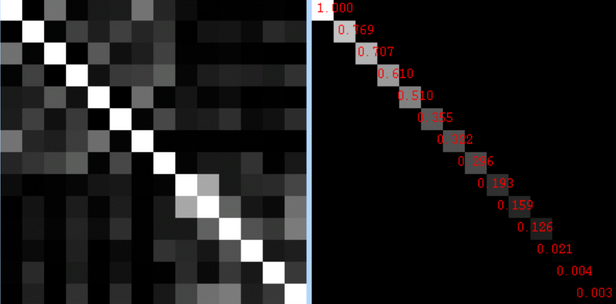
3) After the model is set up and you click on the "Efficiency" tab, you will see two sections. The section on the left represents the correlation between regressors, and the section on the right represents the singular value decomposition eigenvalue for each condition.

What is an eigenvalue? Don't ask me; I'm just a mere cognitive neuroscientist.
For the correlations, brighter intensities represent higher correlations. So, it makes sense that the diagonal is all white, since each condition correlates with itself perfectly. However, it is the off-diagonal squares that you need to pay attention to, and if any of them are overly bright, you have a problem. A big one. Bigger than finding someone you loved and trusted just ate your Nu-...but let's not go there.

As for the eigenvalues on the right, I have yet to find out what range of values represent safety and which ones represent danger. I will keep looking, but for now, it is probably a better bet to do design efficiency estimation using a package like AFNI to get a good idea of how your design will hold up under analysis.


That's it. A few more videos will be uploaded, and then the beginning user should have everything he needs to get started.

FSL Tutorial 2: FEAT (Part 1)


A new tutorial about FEAT is now up; depending on how long it takes to get through all of the different tabs in the interface, this may be a three-part series. In any case, this will serve as a basic overview of the preprocessing steps of FEAT, most of which can be left as a default.

The next couple of tutorials will cover the set up of models and timing files within FSL, which can be a little tricky. For those of you who have stuck with it from the beginning (and I have heard that there are a few of you out there: Hello), there will be some more useful features coming up, aside from reviewing the basics.

Eventually we will get around to batch scripting FEAT analyses, which can save you several hours of mindless pointing and clicking, and leave you with plenty of time to watch Starcraft 2 replays, or Breaking Bad, or whatever it is kids watch these days.


FSL Tutorial 0: Conversion from DICOM to NIFTI


After publishing my last tutorial, I realized that I should probably take a step back and detail how to convert raw scanner images into something that can be used as FSL. This latest walkthrough will show you how to download MRIcron and use one of its tools, dcm2nii, to convert raw scanner image formats such as DICOM or PAR/REC to nifti, which can be used by almost all fMRI software analysis packages.

Note: I've been using Camtasia Studio to make these screencasts, and so far I have been very happy with it. The video editor is simple and intuitive, and making videos isn't too difficult. It runs for $99, which is a little pricey for a screencast tool, but if you're going to be making them on a regular basis and doing tutorials, I would recommend buying it.

Repost: Why Blogs Fail

Pictured: One of the reasons why blogs fail


Blogger Neuroskeptic recently wrote a post about why blogs fail, observing what divides successful from unsuccessful blogs, and why the less successful ones ultimately stop generating new content or disappear altogether. Reading this made me reflect on why I started this in the first place; initially it was to write down, in blog-form, what I saw and heard at an AFNI workshop earlier this spring. Since then, I tried to give it a more coherent theme, by touching upon some fMRI methodology topics that don't get as much attention as they deserve, and creating a few walkthroughs to help new students in the field get off the ground, as there isn't much out there in the way of interactive videos showing you how to analyze stuff.

Analyzing stuff, in my experience, can be one of the most intimidating and paralyzing experiences of a graduate student's career; not because of laziness or incompetence, but because it is difficult to know where to start. Some of the obstacles that hinder the analysis of stuff (e.g., common mistakes involving experiment timing, artifacts that can propagate through an entire data set, not having a method for solving and debugging scripting errors) do not need to be repeated by each generation, and my main objective is to point out where these things can happen, and what to do about them. Of course, this blog contains other topics related to my hobbies, but overall, the theme of how to analyze stuff predominates.

In light of all of this, here is my pact with my readers: This blog will be updated at least once a week (barring any extreme circumstances, such as family emergencies, religious observations, or hospitalization from Nutella overdose); new materials, such as walkthroughs, programs, and instructional videos, will be generated on a regular basis; and I will respond to any (serious) questions posted in the comments section. After all, the reason I take any time out of my busy, Nutella-filled day to write any of this content is because I find it interesting and useful, and hope that somebody else will, too.

Chopin: Nocturne in E-flat Major


This is probably one of the best-known and best-loved out of all Chopin's nocturnes - rightly so. Although it has been overplayed to death, and although several performances suffer from excruciatingly slow tempi, no one can deny its elegance and charm.

The architecture is straightfoward enough: an A section which repeats, followed by a B section, then A again, then B, and a coda, in a form technically known as rounded binary. Chopin's genius lies in keeping the same harmonic foundation in each repeated section while progressively ornamenting the melody, finding ways to keep it fresh and exciting every time it returns. Finally, elements of both themes in the A and B sections are combined into a wonderful coda (listen for them!), becoming increasingly agitated until reaching an impassioned dominant, prepared by a c-flat anticipation held for an almost ridiculous amount of time.

Almost - Chopin, as well as Beethoven, is a master at reaching the fine line separating drama and melodrama, pathos and sentimentality, without going over the edge. The famous cadenza - a four-note motif marked senza tempo during which time stands still - repeats faster and faster, more and more insistent, until finally relenting, and finding its way back to a tender, emotional reconciliation with the tonic.

Enjoy!

FSL Tutorial: Part 1 (of many)


I recently started testing out FSL to see if it has any advantages over other fMRI analysis packages, and decided to document everything on Youtube as I go along. The concepts are the same as any other package (AFNI, SPM, etc), but the terminology is slightly different, and driving it from the command line is not as intuitive as you would think. Plus, they use a ton of acronyms for everything, which, to be honest, kind of pisses me off; I don't like it when they try to be cute and funny like that. The quotes and sonnets generated by AFNI after exiting the program, however, are sophisticated and endearing. One of my favorites: "Each goodbye makes the next hello closer!"

In any case, here is the first, introductory tutorial I made about FSL. I realized from searching around on Youtube that hardly any fMRI analysis tutorial videos exist, and that this is a market that sorely needs to be filled. A series of walkthroughs and online lessons using actual data, in my opinion, would be far more useful at illustrating the fundamentals of fMRI data analysis than only having manuals (although those are extremely important as well, and I would recommend that anyone getting started in the field read them so that they can needlessly suffer as I did).

I will attempt to upload more on a regular basis, and start to get some coherent lesson plan going which allows the beginner to get off the ground and understand what the hell is going on. True story: It took me at least three years to fully comprehend what a beta weight was. Three years. I'm not going to blame it all on Smirnoff Ice, but it certainly didn't help.

Note: I suggest hitting fullscreen mode and viewing at a higher resolution (360p or 480p) in order to better see the text in the terminal window.

Also, the example data for these tutorials can be found here.


Youtube Music Channel

One of my hobbies is playing piano, and recently I bought the equipment to record sound from my electric piano. I own a Yamaha CLP-320 series, which has been an excellent piano and has held up remarkably well for the past three years.

The first recording uploaded from this piano is a nocturne by Chopin in B-flat minor,  opus 9, #1. I have had it in my repertoire for quite a while now, and it still remains my favorite nocturne out of all of them. I plan to upload more recordings with some regularity (e.g., every week or two), so be sure to check out the channel often to see what's new. Subscribing (or even just "liking") is a great way to help me out.

One feature of my videos is annotations which highlight certain interesting parts of the piece, such as important key modulations, any historical background that might be significant, and so on. I also think it looks cool when Chopin spits facts about his music. My goal is for it to be edifying rather than distracting; time will tell whether the public likes it or not.

Anyway, here's a link to the video. Enjoy!

[Edit 07.08.2012]: I removed the annotations, because I eventually found them distracting. Any notes will be placed in the "Description" box, as soon as I convince the recording companies that this indeed my own original work, and not a copy.


Region of Interest Analysis


Before we get down to regions of interest, a few words about the recent heat wave: It's taken a toll. The past few days I've walked out the door and straight into a slow broil, that great yellowish orb pasted in the cloudless sky like a sticker, beating down waves of heat that saps all the energy out of your muscles. You try to get started with a couple miles down the country roads, crenelated spires of heat radiating from the blacktop, a thin rime of salt and dust coating every inch of your skin, and realize the only sound in this inferno is the soles of your shoes slapping the cracked asphalt. Out here, even the dogs have given up barking. Any grass unprotected by the shade of nearby trees has withered and died, entire lawns turned into fields of dry, yellow, lifeless straw. Flensed remains of dogs and cattle and unlucky travelers lie in the street, bones bleached by the sun, eyeless sockets gazing skyward like the expired votaries of some angry sun god.

In short, it's been pretty brutal.

Regions of Interest

Region of Interest (ROI) analysis in neuroimaging refers to selecting a cluster of voxels or brain region a priori (or, also very common, a posteriori) when investigating a region for effects. This can be done either by creating a small search space (typically a sphere with a radius of N voxels), or based on anatomical atlases available through programs like SPM or downloadable from web. ROI analysis has the advantage of mitigating the fiendish multiple comparisons problem, in which a search space of potentially hundreds of thousands of voxels is reduced to a smaller, more tractable area, thus reducing overly stringent multiple comparisons correction thresholds. At first glance this makes sense, given that you may not be interested in a whole brain analysis (i.e., searching for activation in every single voxel in the entire volume); however, it can also be abused to carry out confirmatory analyses after you have already determined where a cluster of activation is.

Simple example: You carry out a whole brain analysis, and find a cluster of fifty voxels extending over the superior frontal sulcus. This is not a large enough cluster extent to pass cluster correction at the whole brain level, but you go ahead anyway and perform an additional ROI analysis focused on the center of the cluster. There are not any real safeguards against this measure, as it is impossible to know what the researcher had in mind when they conducted the test. For instance, what if an investigator happened to simply make a mistake and see the results of a whole brain analysis before doing an ROI analysis? Pretend that he didn't see them? These are questions which may be addressed in a future post about a Bayesian approach to fMRI, but for now, be aware that there exists significant potential for misuse of this technique.

Additional Considerations


Non-Independence
Colloquially known as "double-dipping," non-independence has become an increasingly important issue over the years as ROI analyses have become more common (see Kriegeskorte et al, 2009, 2010).  In order to avoid biasing an ROI toward certain regressors, it is essential that the ROI and the contrast of interest share no common regressors. Consider a hypothetical experiment with three regressors: A, B, and C.  The contrast A-B is used to define an ROI, and the experimenter then decides to test the contrast of A-C within this ROI.  As this ROI is already biased toward voxels that are more active in response to regressor A, this is a biased contrast to conduct. This is not endemic only to fMRI data, but applies to any other statistical comparison where bias is a potential issue.

Correction for Multiple ROI Analyses
Ideally, each ROI analysis should be treated as an independent test, and should be corrected for multiple comparisons.  That is, assuming that an investigator is agnostic about where the activation is to be found, the alpha threshold for determining significance should be divided by the amount of tests conducted.  While this is probably rarely done, it is good practice to have a priori hypotheses about where activation is to be found in order to avoid these issues of multiple comparisons.

ROI Analysis in AFNI

Within AFNI, there exists a useful program called 3dUndump which requires x, y, and z coordinates (in millimeters), radius size of the sphere, and the master dataset where the sphere will be applied. A typical command looks like:

3dUndump -prefix (OutputDataset) -master (MasterDataset) -srad (Radius of Sphere, in mm) -xyz (X, Y, and Z coordinates of sphere)


One thing to keep in mind is the orientation of the master dataset. For example, the standard template that AFNI warps has a positive to negative gradient when going from posterior to anterior; in other words, values in the Y-direction will be negative when moving forward of the anterior commissure. Thus, it is important to note the space and orientation of the coordinates off of which you are basing your ROI, and make sure it matches up with the orientation of the dataset you are applying the ROI to. In short, look at your data after you have generated the ROI to make sure that it looks reasonable.


The following is a short Python wrapper I made for 3dUndump. Those already familiar with using 3dUndump may not find much use in it, but for me, having an interactive prompt is useful:


#!usr/bin/env python


import os
import math
import sys


#Read in Raw user input, assign to variables
print("MakeSpheres.py")
print("Created by Andrew Jahn, Indiana University 03.14.2012")
prefix = raw_input("Please enter the output filename of the sphere: ")
master = raw_input("Please enter name of master dataset (e.g., anat_final.+tlrc): ")
rad = raw_input("Please enter radius of sphere (in mm): ")
xCoord = raw_input("Please enter x coordinate of sphere (MNI): ")
yCoord = raw_input("Please enter y coordinate of sphere (MNI): ")
zCoord = raw_input("Please enter z coordinate of sphere (MNI): ")


#Make string of coordinates (e.g., 0 36 12)
xyzString = xCoord + " " + yCoord + " " + zCoord
printXYZString = 'echo ' + xyzString + ' > sphere_' + rad + 'mm_'+xCoord+'_'+yCoord+'_'+zCoord+'.txt'
os.system(printXYZString) #prints xyzstring to filename given above


#Will need sphere file in this format for makeSpheres function
xyzFile = 'sphere_' + rad + 'mm_'+xCoord+'_'+yCoord+'_'+zCoord+'.txt'


def makeSpheres(prefix, master, rad, xyz ):
cmdString = '3dUndump -prefix '+prefix+ ' -master '+master+' -srad '+rad+' -xyz '+xyz 
os.system(cmdString)
return


makeSpheres(prefix=prefix, master=master, rad=rad, xyz=xyzFile)


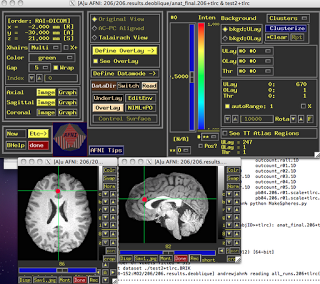
Which will generate something like this (Based on a 5mm sphere centered on coordinates 0, 30, 20):


Beta values, time course information, etc., can then be extracted from within this restricted region.

ROI Analysis in SPM (Functional ROIs)

This next example will focus on how to do ROI analysis in SPM through MarsBar, a toolbox available here if you don't already have it installed. In addition to walking through ROI analysis in SPM, this will also serve as a guide to creating functional ROIs. Functional ROIs are based on results from other contrasts or interactions, which ideally should be independent of the test to be investigated within that ROI; else, you run the risk of double-dipping (see the "Non-Independence" section above).

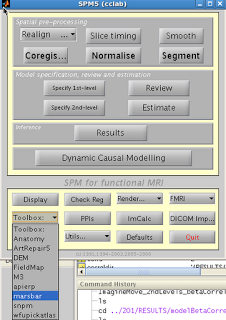
After installation, you should see Marsbar as an option in the SPM toolbox dropdown menu:

1. Extract ROIs

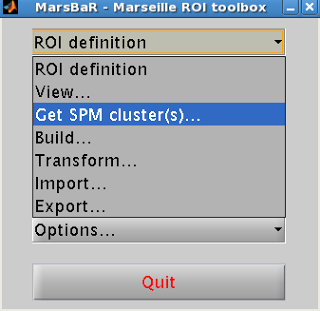
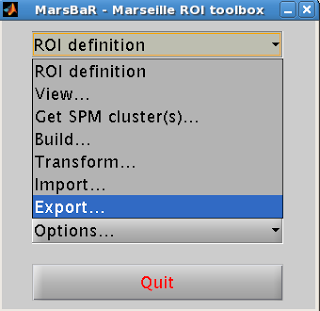
After installing Marsbar, select it from the toolbox dropdown menu.  After Marsbar boots up, click on the menu “ROI Definition”.  Select “Get SPM clusters”.


This will prompt the user to supply an SPM.mat file containing the contrast of interest.  Select the SPM.mat file that you want, and click “Done”.

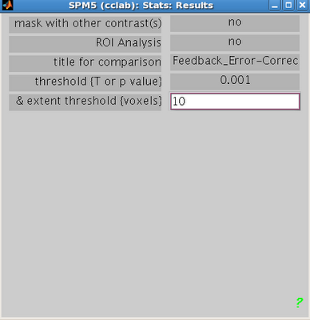
Select the contrast of interest just as you would when visualizing any other contrast in SPM.  Select the appropriate contrast and the threshold criteria that you want.


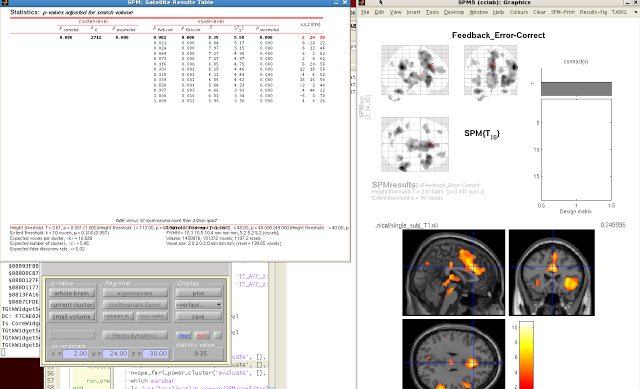
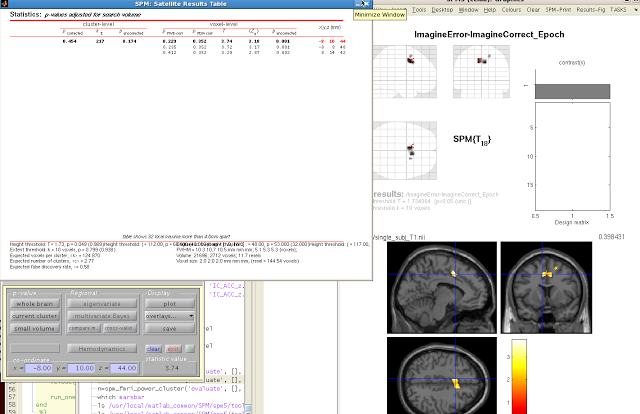
When your SPM appears on the template brain, navigate to the cluster you wish to extract, and click “current cluster” from the menu, underneath “p-value”.  Highlight the cluster you want in the SPM Results table.  The highlighted cluster should turn red after you select it.


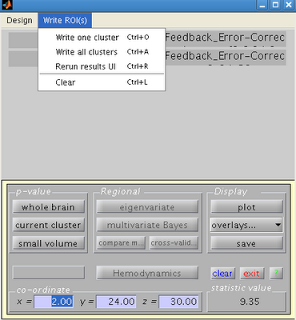
Navigate back to the SPM results menu, and click on “Write ROIs”.  This option will only be available if you have highlighted a clutter.  Click on “Write one cluster”.  You can enter your description and label for the ROI; leaving these as default is fine.  Select an appropriate name for your ROI, and save it to an appropriate folder.


2. Export ROI

Next, you will need to convert your ROI from a .mat file to an image file (e.g., .nii or .img format).  Select “ROI Definition” from the Marsbar menu and then “Export”.


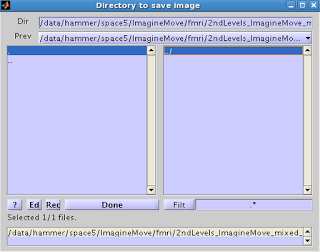
You will then be presented with an option for where to save the ROI. 


Select the ROI you want to export, and click Done.  Select the directory where you wish to output the image.  You should now see the ROI you exported, with a .nii extension.

3. ROI Analysis

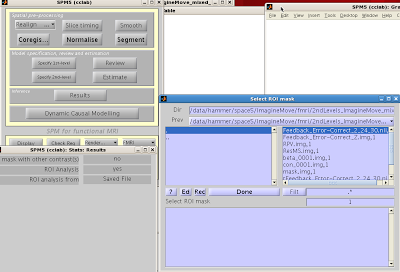
You can now use your saved image for an ROI analysis.  Boot up the Results menu as you would to normally look at a contrast, but when prompted for “ROI Analysis?”, select “Yes”. You can select your ROI from the “Saved File” option; alternatively, you can mask activity based on atlas parcellations by selecting the “Atlas” option.


The constriction of search space will mean fewer multiple comparisons need to be corrected for, and thus increases the statistical power of your contrast.